
OpenAI just released GPT-5.2, the newest upgrade in the GPT-5 family — and it’s already being called the most capable model yet for work and learning. Whether you’re writing a thesis, debugging code, summarizing research, or prepping a business case — GPT-5.2 is designed to help students work faster and smarter.
This post breaks down the key upgrades, why they matter for learners, and how you can put them to work right away.
What’s new in GPT-5.2?
Smarter research & learning assistance
GPT-5.2 comes with enhanced reasoning and long-context understanding, meaning it can process and synthesize large documents — like research papers, lecture transcripts, or business reports — more accurately than before. This is especially useful for:
- Summarizing long articles
- Extracting key points from PDFs
- Combining insights from multiple sources
That makes GPT-5.2 a stronger ally for literature reviews, case studies, and research synthesis.

Better support for projects & presentations
Students often juggle assignments that span multiple skills — spreadsheets, slide decks, and coding tasks. GPT-5.2 boosts its abilities in these areas:
- Generates structured spreadsheets with correct formulas
- Builds formatted presentations with clear points
- Creates code examples and debugging help
Benchmarks show GPT-5.2 can outperform the previous version by a wide margin on real work tasks, completing them faster and with fewer errors.
Coding help & troubleshooting
Coding assignments — whether for CS classes, hackathons, or personal projects — just got easier. GPT-5.2’s programming enhancements mean it:
- Writes cleaner code
- Identifies bugs with better accuracy
- Explains logic in plain language
For students learning programming or building apps, this means fewer roadblocks and faster iteration.
Why GPT-5.2 matters for students
With improved explanations and step-by-step answers, GPT-5.2 acts like a 24/7 tutor that can help with subjects ranging from marketing and economics to mathematics and computer science.

Better project outcomes
Instead of spending hours formatting documents or fixing code, students can focus on critical thinking, analysis, and creativity — the skills that really count in business and research.
GPT-5.2 hallucinates less — meaning its responses are generally more factually reliable compared to earlier versions — but like all AI, it’s important to double-check critical answers.
Beyond ChatGPT: Tools & integration
GPT-5.2 powers more than just ChatGPT. It’s available through the OpenAI API, enabling other tools and platforms to integrate its capabilities — including data science assistants, developer tools, document analyzers, and education platforms.
For students who code or build tools, that means you can experiment with GPT-5.2 directly in projects and apps.
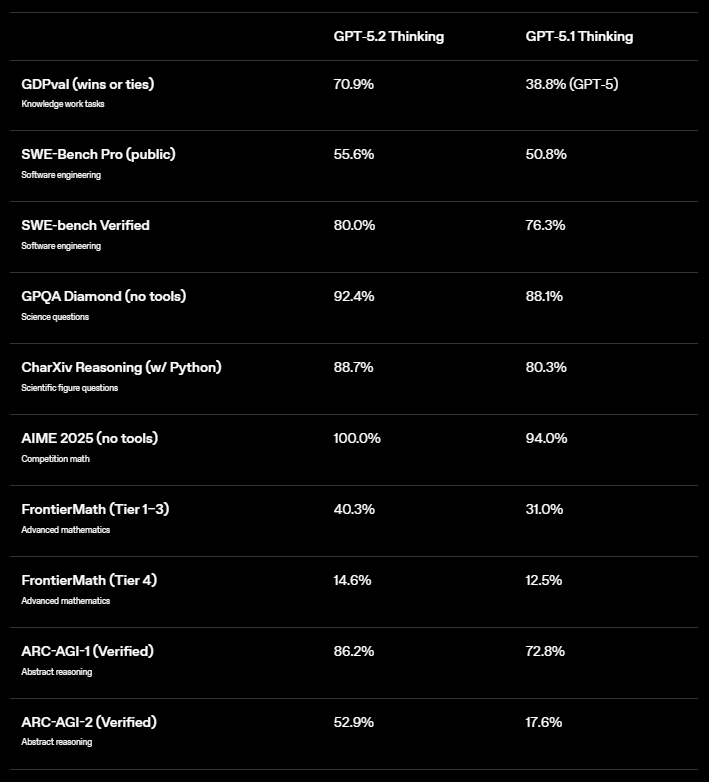
Source: OpenAI
How students can use GPT-5.2 right now
Here are some student-friendly use cases and an article explaining how students are using AI in business, we think you might like.
Homework & research
Use GPT-5.2 for better summaries and explanations of complex topics — from finance principles to AI algorithms.
Business case simulations
Write and evaluate mock business plans, extract insights, or run SWOT analyses based on your case materials.
Coding projects
Let GPT-5.2 assist with language syntax, logic explanations, and even full templates for apps or scripts.
Final thoughts
GPT-5.2 isn’t just another version number — it’s a step toward more capable, reliable AI collaboration. For students in business, tech, and research, this update means: faster work, deeper insights, and more time to focus on what matters most — creativity and critical thinking.
Helpful Resources
- OpenAI Release Notes (official) — latest model changelog
- Stay up to date with our other AI release notes
Leave a Reply